

[ 01 // for msps ]
Every ticket triaged.
Every invoice billed.
QuantumOps reads every ticket as it lands in your PSA, drafts the triage and researches the fix. BillingBot turns distributor invoices into Halo billing. Built by an MSP, for MSPs.
 Ticket triageQ-Director
[ 02 // two products ]
Two products. One for the desk, one for billing.
Run one or both. QuantumOps plugs into the PSA you already use, and BillingBot bills through HaloPSA.
QuantumOps
The AI service desk layer for your PSA.
QuantumOps reads each ticket, explains its triage, researches the fix and puts it in front of the tech, inside your PSA, in a browser side panel or in Slack and Teams. Dispatches, replies, merges and status changes wait for a person, unless an administrator pre-allows a step in Ticket Autopilot or switches on Auto triage.
- Q-Director triage with reasoning and a confidence score
- Sherlock research across your tickets, docs and the web
- Ticket Autopilot: a cited plan the agent locks, run under your policy
- Qubit, the assistant that answers from your own history
- Dispatch, phones, CSAT, QBRs, agent coaching and Q-Missions
- AI included, or run it on your own keys
From $1,499/mo · 14-day trial
BillingBot
Distributor invoices, straight into HaloPSA billing.
BillingBot reads the invoices your distributors actually send, prorates and arrears included, and bills them through HaloPSA, coded for QuickBooks Online or Xero. Most MSPs are live within hours.
- Pax8, Ingram Micro, D&H, ITCloud.ca and Twilio
- Any other vendor by CSV import
- New, appended or recurring invoices, your choice per client
- New SKUs created in Halo for you
- Unlimited users
$99/mo · 7-day free trial
[ 03 // what’s new ]
QuantumOps grew up.
It started as a set of HaloPSA dashboards. Now it is the layer your whole desk works in.
A plan when the agent opens the ticket
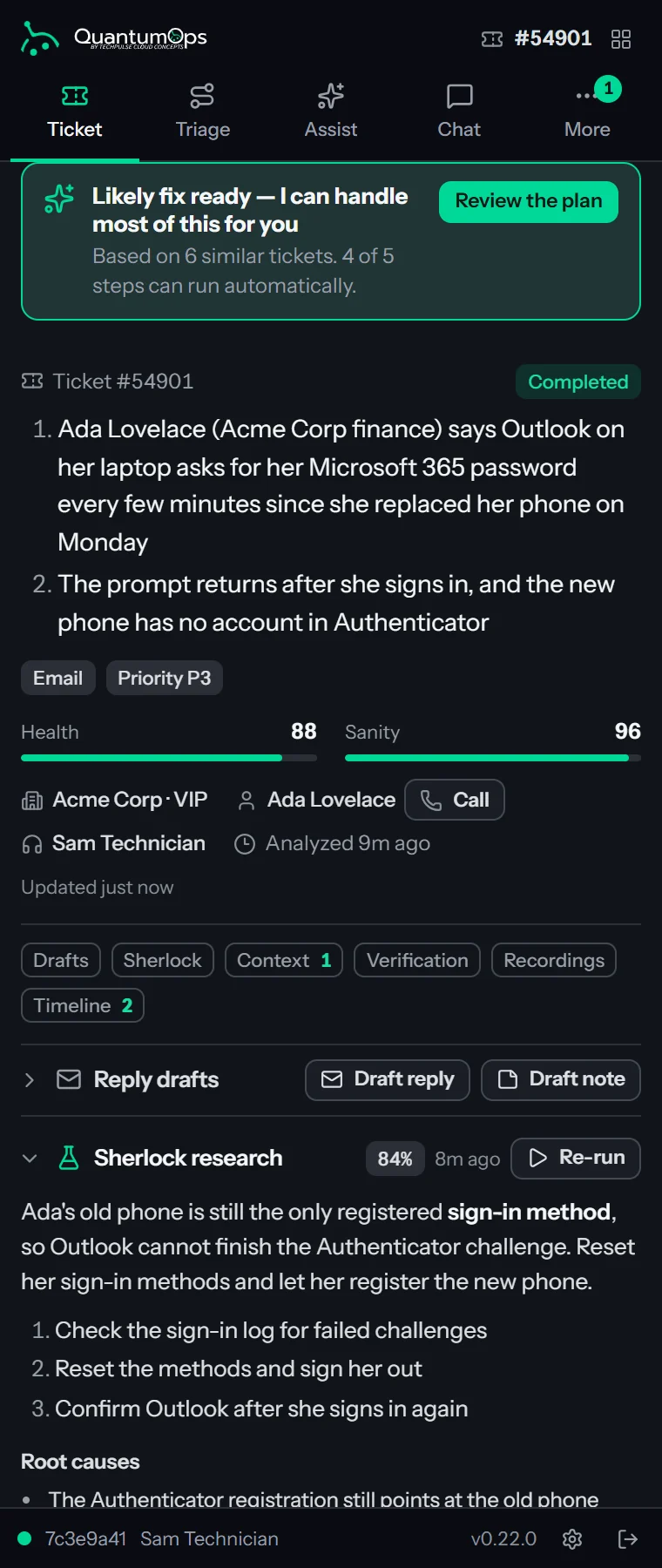
Ticket Autopilot builds a cited resolution plan from your own history. The agent reviews it and locks it after one summary, and QuantumOps runs it under your policy, asking before it changes anything or writes to a customer.
A side panel that follows the tech
The QuantumOps browser extension, for Chrome, Edge and Firefox: the ticket, the triage, the plan, the caller and Qubit next to whatever PSA page is open. Install it from the Chrome Web Store or Firefox Add-ons.
Reads run. Changes ask.
For Qubit’s tools and for Ticket Autopilot, admins decide what runs, what asks and what never runs. Out of the box a tech confirms each change to your PSA, and a message to a customer always waits for a click.
A dispatch command center
Every open ticket on one board, the queue ranked by breach risk, and assignments written to your PSA before the board moves.
Phones on the right ticket
Call Taking, recordings transcribed and matched to the ticket, and caller verification with Microsoft Verified ID or an Authenticator step-up.
Insights leadership uses
The Customer Success Center, CSAT in one click from an email, the Agent Performance Hub and QBRs written from your PSA data.
Bounties and rewards for the desk
Q-Missions lets a manager put a reward on a ticket or a quest. Agents claim it, your PSA confirms the work, and the pay-out is points on the leaderboard or a product from your own Zinc wallet.
Notices and direct messages
A Q-Notice tells the team, and the AI, once. Q-Notify sends one agent a message from the dispatch board, and a Call button dials from the ticket.
Help, support and ideas, built in
Support, Suggest an idea and the help center sit in the web app’s header, and the side panel links to the same places, with a feedback portal that shows the roadmap and what’s new.
[ 04 // how it works ]
Plug in once. Q-Director drafts, a person decides.
01
Connect your PSA
A 12-step setup wizard, saved as you go, lets you pick your PSA and connect it with API credentials, links your own QuantumOps instance with verified webhooks, and imports your ticket history with a cost estimate first. On HaloPSA it also adds the QuantumOps tabs to tickets and clients.
02
Pick your AI
Run on the AI we manage, or bring your own Anthropic, OpenAI or Together AI keys. Choose the model for each job and set a monthly AI limit: QuantumOps warns you at 80% and pauses AI processing at 100%.
03
Work the queue together
Every new ticket is summarized, triaged with its reasoning and researched. The agent gets a cited plan to review, built ahead of time for the tickets you filter for, or for every new ticket when Plan every new ticket is on. Otherwise a ticket is planned the first time someone opens it. A dispatcher applies the recommendation in one click, and overrides are recorded for review.
[ 05 // built for your role ]
Built for every seat in the shop.
Service managers
Stop hand-sorting the queue.
Q-Director drafts team, type, urgency and technician on arrival. The dispatch board shows who can take the next ticket.
Technicians
Answers without leaving the ticket.
The summary, Sherlock’s research, a cited fix plan and Qubit sit next to the ticket.
Owners
See the whole shop at once.
Which clients are drifting, which techs are overloaded, and a QBR ready before the meeting.
Finance
Month-end without the spreadsheet.
BillingBot bills distributor invoices through HaloPSA. The payroll add-on runs clock-ins through to paystubs.
[ 06 // integrations ]
Masters of middleware.
Your PSA in the middle. Your AI, docs, phones and distributors around it.
The center
Your PSA
QuantumOps lands in the PSA you already run, and BillingBot bills through HaloPSA. On HaloPSA, both work in every Halo hosting region, custom domains included. We’ve run 450+ Halo implementations, so the plumbing is familiar.
AI models · QuantumOps
Documentation · QuantumOps
Chat and alerts · QuantumOps
Phones and speech · QuantumOps
Identity · QuantumOps
Tools · QuantumOps
Distributors · BillingBot
Accounting, via Halo · BillingBot
[ 07 // pricing ]
Pricing for QuantumOps
and BillingBot.
QuantumOps comes two ways: AI included, or on your own keys. Pay yearly on your own keys and save 15%. BillingBot is one flat price.
QuantumOps
All-inclusive
AI included, pricing coming soon.
| Pricing | Coming soon |
| Trial | 14 days |
QuantumOps
Bring your own key
Your Anthropic, OpenAI or Together AI keys, priced by agents.
| 25 agents | $1,499/mo |
| 50 agents | $2,499/mo |
| Unlimited agents | $3,499/mo |
| Trial | 14 days |
BillingBot
One plan
One price, unlimited users.
| Monthly | $99/mo |
| Yearly | $999/yr |
| Free trial | 7 days |
[ 08 // security ]
Your instance. Your keys. Your call.
The short version. The long one is on the security page.
Your own instance
Every MSP gets its own QuantumOps instance: its own container, its own database, its own address.
Encrypted keys
PSA credentials, AI keys, Slack and Teams secrets and tool-server tokens are encrypted with AES-256 under a key unique to your instance.
Verified traffic only
PSA webhooks are rejected unless they pass verification.
Two-factor and roles
Two-factor sign-in from day one, and 15 roles that decide who sees which dashboards and tools.
A person decides
Dispatches, replies, merges and status changes wait for a person, unless an administrator pre-allows a step in Ticket Autopilot or switches on Auto triage. A tech locks an Autopilot plan after one consent summary, a step that needs approval goes to a named approver, and each decision is recorded under a name.
Your AI, your rules
Run on your own AI keys if you prefer, choose the models, see the cost of every AI call, set a limit that pauses processing, or let an administrator stop all AI with one switch.
TechPulse is SOC 2 Type II certified. The report is in our Trust Center.
Which PSA do I need?
HaloPSA, Autotask or ConnectWise PSA: the one you already run. QuantumOps works with all three, and BillingBot bills through HaloPSA. If you’re still moving to Halo, we’re one of the original authorized onboarding partners, with 450+ implementations behind us.
Does the AI change tickets on its own?
In a few ways, and each is a setting. Q-Director keeps the ticket category (and the resolution category at closure) current, with a note each time; it is on for new instances and you can switch it off. If you switch on Auto triage and assign tickets (off by default), Q-Director routes a ticket nobody has triaged within the wait you set to a team and ticket type you allowed, with a note, and never to a named agent. With call recording, a call matched through a Call Taking session, or by the AI at 90% confidence or more, posts as a call log plus a transcript note hidden from end users, unless you turn auto-post off; other matches wait for a person. With CSAT, each rating posts to the ticket as a note, private by default. Sherlock’s private research note reaches the ticket only if you switch it on, and on HaloPSA so do Guided Work’s ticket colors.
Ticket Autopilot runs a plan that an agent has reviewed and locked. Out of the box, changes to your PSA wait for the agent’s click and StackJack changes go to an approver; a message to a customer always waits for a click unless an administrator allows unattended sends, and destructive tools always wait for a click. An administrator can pre-allow changes, and auto-run for a routine stays off until an administrator allows it. Every run ends with one private note on the ticket. Everywhere else, dispatches, merges and status changes made from the dispatch board, the Triage tab or the side panel wait for a person, and a Qubit tool that changes something asks first unless an administrator allows it.
Which AI models does QuantumOps use?
On Managed AI, Anthropic Claude models. On your own keys, also OpenAI and Together AI open models such as Llama, Qwen and DeepSeek. You pick the model for each job from a catalog we keep current, and embeddings and reranking come from Voyage AI.
Where does our data live?
In your own QuantumOps instance and database on Microsoft Azure in the US. Ticket text also reaches the AI provider doing each job, Voyage AI for search and a US search index; the security page lists every service. The credentials you give us are encrypted with a key unique to your instance.
How long does BillingBot take to set up?
Most MSPs are fully up and running within hours: connect Halo, authenticate your distributors, map your clients and set your billing rules.
Is there a QuantumOps trial?
Yes. QuantumOps comes with a 14-day trial. Book a demo and we’ll set it up on your PSA.
[ 10 // built by an msp ]
Born in the bayou. Forged in the cloud.
TechPulse started in 2009 as an MSP in Louisiana, and it still runs one. Everything we build is used on our own desk first: BillingBot began as a PowerShell tool for our own Pax8 invoices.
The team works out of Youngsville, Louisiana and Medellín, Colombia, where TechPulse LATAM made 20 hires in its first year.
2009
Founded as a Louisiana MSP
450+
HaloPSA implementations
2
Offices: Youngsville and Medellín
20
LATAM hires in year one
[ 11 // start ]
Let’s talk shop.
No sales pitch required. Bring your service desk questions.